vs.
My Nokia E71 is a very good smartphone. But when I am on a trip and in the need for a desktop computer replacement, I would often like to trade the hardware keyboard for more screen space. When using it as a mobile browser, phone or movie viewer, newsreader or email client (mostly for reading and deleting), more than the half of the front of the device wasted by the keyboard. Though having a full keyboard is great, I never have been a fan of fiddling with T9, the E71's keys are too small for typing more than a few words.
The obvious smartphone for a usage profile like mine is a full screen touch device. As a satisfied Symbian user on the mobile phone and an Apple fanboy on the desktop, the iPhone and the Nokia 5800 eXpress Music are my candidates. I don't like Windows mobile devices. They are slow and the UI never seemed really to be made for smartphones. Instead, WM is giving the user some desktop complexity on the phone. Even Though Blackberry now offers a touch screen device, their focus is mainly on the QUERTY keyboard email phones. And Google's Android is immature, I will maybe take a look at it in one or two years. So it will be a two horse race.
I took both for a week as my only device and rated the functionality from 0 (worst) to 5 (best). As both, Apple and Nokia already announced new features in coming releases, I tried to take them into consideration as far as they are known by now. So the first two columns in the summary are containing the rating as the phones are now. The last two columns consider, how the rating will be when all current announcements are delivered.
Hardware
Display
Both phones are coming with very good displays. The iPhone's is bigger in size, but the 5800 has the higher resolution (640*360 vs. 480*320). The iPhone's capacitive screen is more responsive, the 5800's resistive screen is more precise. Both are among the best touch screens available today, in the end it is a matter of taste.
Rating: 5800=5, iPhone=5
Camera
The Camera is a well known weakness of the iPhone. But it is not that bad as it's specification. On good light condition, the iPhone makes good colored photos. But with 2 megapixel, they are of visible low resolution. The iPhone has no autofocus, no flash and no video recording capabilities. This will probably change with the next iPhone.
The 5800's camera isn't good also, though it has 3.2 megapixel, Carl Zeiss optics, dual LED flash, autofocus and video recording capabilities. But in good light conditions, it is a quite reasonable device for snapshots and the movies are usable. The 5800 has a real camera button, pressing it half way enables the auto focus and pressing it completely takes the photo. And it starts the camera from any application.
Rating: 5800: 3, iPhone: 1 (probably 3 with next iPhone release)
Speakers
The iPhone's speakers are OK and good enough to listen to podcasts in silent locations. The 5800's are better, probably the best speakers on any phone. With the 5800, I will definitely leave my external speakers at home on my next business trip.
Rating: 5800: 5, iPhone: 3
Battery runtime
The 5800 comes with a 1320 mAh battery which last about 2 days on my average usage, several days on moderate usage and only at heavy usage just one day. So it does not last as long as a battery monster like the E71, but it gives the user a quite reasonable battery life. The iPhones battery is a bit smaller, but it's energy consumption seems to be much higher. The iPhone's battery would last a day only on moderate usage. The 5800's battery can be exchanged, so it could be used as movie player for trans atlantic flights. The iPhone's battery can not be changed.
Rating: 5800: 4, iPhone 1
Build Quality
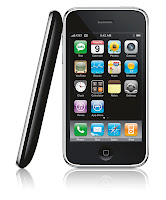
The iPhone looks gorgeous. It has a superb build quality, though for the price that it could not be opened, e.g. for battery exchange. The 5800 looks a lot cheaper.
From all other sides, exept for the front with the touch screen, it does not differ from any phone which comes for free with your contract. In fact, it is more solid than it looks and also delivers a good build quality.
Rating: 5800: 3, iPhone: 5
System Software
Operating System
The iPhone runs Mac OS X, which is a BSD Unix based on a Mach Microkernel. So although it is relatively new on the phone, it is basically a very mature OS. It is a stripped down version of the same Mac OS, which is the main reason why people prefer Mac's over Wintel PC's. One big advantage on the Mac is, that it has got a great user interface, but you can always digg down to the OS level and customize in any way you like it. Though probably a major percentage of Mac users never did this, for power users like me it is very relaxing to know that it is possible. On the iPhone, Mac OS is completely different. It comes with a simplified UI with no chance of customizing anything to your needs. Though Mac OS X on the Mac does support multitasking, it is not possible to multi task user applications. According to Apple, this is only because multitasking would drain the battery too fast. Interestingly, every multitasking Symbian Phone offers a better battery life than the iPhone.
Though the iPhone has a real file system, it is not accessible to applications. Every process can only access files in it's own directory. So it is not possible to start working on a file and then do something with them with a different application. The file system is also not available from the outside. It is not possible to copy some files from a connected computer to the iPhone. There are some apps, that allow to copy files via WLAN and a WebDAV server onto the phone. But then, the restriction that a program can only access it's own directory, applies. So if you want to use files in different formats on the iPhone, you need several programs, each implemented it's own WebDAV server and file store.
Symbian OS is the predecessor to the system running on the old Psion PDA's and is also a very mature OS. It offers true multitasking and supports SD and SDHC memory cards. A connected computer can have access to the phones file system and data can be exchanged via a micro SD card. The 5800 comes with a 8GB micro SDHC card, which could be exchanged with a 16 GB model. And as 32 GB cards are out now, it is just a matter of time until the 5800 will support them.
The important thing is: both phones can be used to synchronize photos, movies and audio files onto them and use them. A user does not care about where the files are kept in the file system, he event does not need to know what a file system is. But only on the 5800 it is possible to access them directly if the defaults do not fit your needs.
Rating: 5800: 5, iPhone:1
Phone Application
Both phones are coming with quite comparable phone applications, but there are differences in detail. The 5800 has dialing shortcuts on the numeric keypad, voice dial. In the phone book, the 5800 offers an incremental search. At the beginning, it shows all keys A-Z. After pressing the first letter key, it shows all matching contacts and removes all letter keys, which would not lead to a match. In my phone book with about 500 entries, it normally takes 2-3 key presses until I got the desired contact. Pressing the green key on the 5800 always leads directly to the phone app. Pressing the red key immediately ends the call. For ending a call on the iPhone, it takes a second after removing the iPhone from the ear, until the proximity sensor recognizes the situation, enables the display so the on screen button for ending the call can be touched.
It is obvious to see, that Nokia has built years of experence into the 5800, making every day tasks quick and easy. The iPhone lacks many of these features, so it requires more UI navigation than the 5800 to get common tasks done.
Rating: 5800: 5, iPhone 2
Ringtones
The iPhone comes with a built-in ringtone. Music titles can be bought as ringtones in the iTunes music store. On a Mac, Garage Band can be used to build own ringtones, which could be in fact just titles from the music library cropped. I have never heard of another phone with such arbitrarily limitation.
On the 5800, everything that can be played could also be used as a ringtone.
Rating: 5800: 5, iPhone: 2
On Screen Keyboard
Touch screen phones need an on screen keyboard. The iPhone only offers a keyboard in non-landscape mode. It only has letters on the main keyboard page. For punctation a different keyboard page has to be used. For special letters like German umlauts, the corresponding base latter has to be pressed for a few seconds and a popup menu with possible special characters appears. For writing with punctation and umlauts, this results in a significant lower writing speed than with the 5800. There is no tactile feedback on the iPhone. But iPhone OS 3.0 will come with a landscape keyboard for all apps from Apple.
The 5800 gives the choice between three different keyboards. There is a classical 12 keys phone keyboard with T9 support, which might be suitable for short text entries. The 5800 also offers a full keyboard for non-landscape mode, though it is a little small. For longer text entries, the landscape mode keyboard is the best choice, with keys for umlauts and punctation. It also has cursor keys for navigation, so typos could easy be corrected. Optional, there is tactile feedback via the vibration alert. In summary, I could type a lot faster on the 5800 than on the iPhone.
Rating: 5800: 4, iPhone 2 (3 with OS 3.0)
UI Navigation
The UI of the iPhone is absolutely simple. The whole OS Interface consist of a programm launcher with 4*4 icons visible. There is a maximum of 9 pages (probably 11 with OS 3.0), which can be changed by flipping left and right. The bottom 4 program icons are on every page, these are the typically most needed ones. The iPhone UI isn't too complicated for anyone, even unexperienced users who never had a smartphone before, will get it immediately. But on the other hand, this is just an absolute minimum of functionality. There is no concept for distinguish between frequent ore seldom used apps, they are all on the same level except for the four apps on the quicklaunch bar.
For switching between two applications, the only button has to be pressed to get back to the program launcher. Then the user has to flip to the page containing the second application and launch it. At worst case, this would mean if the apps are on page 1 and page 9, the first app is left by pressing the button, then the user has to flip the screen 8 times to the left or right, then start the 2nd app. For tasks, where it is necessary to interact with two applications, this can become quite annoying. But doing tasks with more than one app is nearly impossible on the iPhone anyhow. As every app can only interact with data in it's own memory space and there isn't even cut & paste (but will be in iPhone OS 3.0), I could not see how any task spanning more than one application could be done at the iPhone. This is a serious limitation, which no other smartphone OS has.
The iPhone is also inefficient in navigating from standby. When double-clicking the button for getting to the phone app in standby, the slide-to-unlock screen appears. The user now has to slide a button from left to right to unlock the phone. Now, it does not lead to the phone app as expedted, but to the application launcher. Now, the user has to double click again to finally get to the phone app.
Symbian also comes with a program launcher, which uses a folder concept instead of the pages of the iPhone OS. So the user could structure his applications in any folder structure he likes, giving him fast access to his most used apps on the top level. Seldom used programs could be hidden away in folders and do not distract on daily usage.
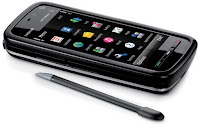
The white button in the middle leads to the program launcher, just like the iPhone button. But most of the time, users won't need the 5800's program launcher. The green key on the left directly starts the phone app, even is the 5800 is in standby. There is a media key above the screen, opening a quick start menu for music, photos, online sharing, movies and web browsing. From any application, the media brings you directly to the chosen app.
There is even less need for the program launcher, if the today screen is used. It shows the calendar, now playing, radio information as well as the clock, status of the different networking functions and profiles. Everything on the today screen is touchable and leads to the corresponding app. Touching the next appointments section leads to the calendar. Touching the clock brings up the clock application. Everything is as you would expect. On top of the information area is a quick launch bar for your four favorite apps. But unlike the iPhone, which already uses it's quick launch bar for phone, mail, browser and media player apps, on the 5800 these four slots could be used for individual apps, because everything in the iPhone quick launch can already be accessed by the 5800' UI components.
Switching between running apps is easy, just press and hold the middle white key and a window pops up with the icons of all running tasks where the app can be chosen just by tapping on it. As Symbian supports multitasking, tasks which require more than one app are easy to do, eg. copy & past some data from an email into a web formular.
The 5800 has a lock/unlock key on the right side, which could easily used one handed. This is more usable than the iPhone's key press and then slide-to-unlock functionality.
Due to the size of the iPhone, it is hard hard to use it with one hand, and for the two finger gestures, two handed operation is a must. The 5800 is slim enough to hold it in one hand and operate it with the thumb. As the 5800 does not require two finger gestures, it is good usable with just one hand.
Rating: 5800: 5, iPhone: 1 (2 with OS 3.0 and Cut & Paste)
Customzation
The 5800 is very customizable. Like all other S60 phones, it supports profiles for different situations. Profiles take care of the volume level, which ringtone will be used, if there is tactile feedback and other things. For the look, different themes can be applied, and there is a huge number of themes out on the web. Themes do not only control the colors, fonts and background images, but could also contain icon sets for the default applications. I love to have a winter theme on my phone around christmas. The 5800 gives the user the choice of three different main screens. An empty one, one to follow the activities of up to four friends and the classical one with shortcuts to applications, upcoming calendar entries and some other notifications.
On the iPhone, a startup screen image and the four quick launch applications can be configured.
Rating: 5800: 5, iPhone: 2
Today Screen
The first screen I want to see on my smartphone should show me relevant information and quick access to my most needed functionality. The 5800 offers me the classical S60 Today screen with upcoming calendar entries, clock, new messages and calls as well as quickstart icons to favorite apps, making it a perfect business smartphone. Additional, the media key gives me quick access to all my media as well as maps and the web. Unfortunately, the today screen of the 5800 is less customizable than the one from the E71. For users who are more Web 2.0 community users, the 5800 offers a different start screen, showing your favorite four contacts with their latest information from Email, SMS and RSS-feeds (which, of course, could post their latest facebook, Twitter etc. news).
The iPhones central screen ist the list of startable apps. The phone and message or mail icons show the numbers of calls and messages, which prevents it from getting zero points.
Rating: 5800=4, iPhone=1
Audio Player
Now this is where the iPhone collects Points, as it is a complete iPod Touch which is close to perfection. But as it is a closed system like the iPod, it is not possible to connect it to any computer, copy some audio files onto it and play them. It is necessary to sync the music via iTunes and this is only possible from just one Computer. Before a music file could be synced from a different computer, iTunes would remove all existing media files from the device. This results in minus one point.

The 5800 has a quite usable media player and with Nokia Media Transfer it is easy to sync iTunes playlist with the device. Alternatively, nearly any audio file could be copied onto the device and just plays. But the player does not show iTunes cover art and does not sync the play counter.
So additional to my 5800, I will keep my old iPod classic for my car. For business trips, the 5800 is a good enough media player to leave the iPod at home. With an iPhone, there is no need for an additional iPod.
Rating: 5800=3, iPhone=4
Video Player
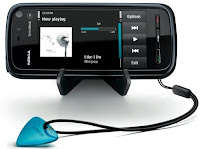
The video players of both phones do a very good job and are probably the best ones on any phones. But while the iPhone is very limited to MPEG4 and h.264 video, the 5800 plays much more formats like flv, wmv. Additional, just like the audio player, videos could be copied from any computer to the 5800 via bluetooth, USB or the memory card whereas the iPhone needs to sync videos via iTunes from just one computer. Syncing from a different computer will erase all video on the iPhone first.
Rating: 5800: 5, iPhone: 3
PIM
Every smartphone comes with personal information management (PIM) software. The iPhone comes with a calendar app, which supports multiple calendars and push sync with mobile me and Exchange servers. There is no ToDo management on the iPhone, but there are many ToDo and GTD apps in the App Store and some of these sync to the corresponding desktop app – but only on the Mac. Entering a new calendar entry is a bit fiddly and requires to navigate through two dialogs. The date picker is nearly useless, because it is just finger friedly entry entry of numbers. But if you want to schedule a meeting for Monday in four weeks, you should know what date this is because you won't get a mini-calendar to pick it from. The iPhone comes with a notes taking app, but in iPhone OS 2.x these notes do not sync with the desktop. But this will change in OS 3.0. On the PC, the iPhone syncs with Outlook via iTunes. But this does not work very well. It takes long and it is not possible to see what it is doing. Sometimes the sync just hangs. Sometimes it finshes and some calendar entries are deleted without notice. On the Mac, sync runs perfect with Apple's iSync. In summary, the PIM functionality looks more like an addon, than an essential functionality.
The 5800 comes with a calendar and ToDo as well as a notes taking app. It syncs perfect with Outlook on the PC via Nokia's PC Suite or OVI Suite and always gives detailed feedback as well as a detailed log at the end. It is faster than Apple's solution by an order of magnitude and very reliable. I never had the slightest syncing error on any device for years. Syncing on the Mac works through iSync without any problems. The 5800 syncs over the air via it's embedded sync application. For syncing with other calendars like the Mozilla Lightning, there is a bunch of 3rd party software to solve nearly every sync problem. Like the iPhone, the 5800 does not have a date picker. But the major drawback of all S60 phone calendars is, that there is only one calendar with no categories. Interestingly, Symbian OS does support calendar categories since Rel. 9.1 (the 5800 runs Symbian OS Rel. 9.4) and some 3rd party calendars make use of them. But S60.com ignores this much desired feature wish since years. Hopefully, the Symbian.org will support calendar categories.
Rating: 5800: 4, iPhone: 3
Web Browser
When the iPhone came out, it offered the best web browser available. It's only disadvantage is, that it does not support Flash. This is why the iPhone needs a YouTube application.
The 5800's browser is based on the same WebKit rendering engine than the iPhone's. It seems to be a little slower than the iPhone's browser, but it supports Flash so YouTube could be used as on a desktop PC. It is even capable of full screen support for YouTube videos.
Rating: 5800: 4, iPhone: 4
Email client
Both phones are very good email devices. The built in email client of the iPhone is better than the 5800's email client, but is has no landscape support for the on screen keyboard. This will be enhanced with iPhone OS 3.0. Nokia is readying it's new email client Nokia Mail, which is our for several devices now and a version for the 5800 will follow soon. Until then, for about € 22,- the enhanced email client ProfiMail could fix this.
Rating: 5800: 5, iPhone: 4 (5 with landscape support in OS 3.0)
Ecosystem
Application Support
Apple has just announced 25.000 apps available on the AppStore. With the AppStore app, it is extremely easy to load new applications onto the phone. iPhone apps are cheap, but most of them are very simple. But Apple unfortunately restricts the capabilities: Apps can only be distributed through Apples AppStore, download is only allowed from WLAN but not from 3G networks and not every app is allowed by Apple. When I buy a phone, I own it. I want to install whatever software I like and do not want to ask the manufacturer for allowance. This results in one point penalty.
Without having them counted, there are thousands of applications for Symbian S60 and there are some good application stores like mobile2day and Handango. There is also a huge amount of software available directly from the developers sites. Installation is easy from both, Mac and PC. And Software could also be directly downloaded from the Device. The iPhone way is easier, but the Symbian way is more flexible. In the end, both are rated the same. But Nokia has announced it's own application store, called Ovi Store, for the next months. This would give Symbian users an easy solution like Apple's, and also maximum flexibility for power users.
Rating: 5800: 4 (5 with Ovi Store), iPhone 4
Development Environment
I have never tried it, but the iPhone SDK is said to be close to perfection. One drawback might be, that it is only available for the Mac. This is no problem for me, as the Mac is my preferred platform anyway, but for someone who don't like Macs this could be an issue. Another thing is, that it is build upon ObjectiveC, whereas the rest of the world uses C++.
The Symbian S60 5th Ed. SDK is based on Eclipse, which is definitely the industry standard. There is a huge amount of plugins for Eclipse to enhance developers productivity. It is still work in progress, but very promising. Additional, Nokia bought Trolltech, the makers of Qt toolkit which is the basis of the KDE Linux desktop. There is also a beta of Qt for S60 and some demo movies, showing how easy S60 development will become. When this comes out, it could catch up with the iPhone's SDK, as Trolltech is very experienced with UI development. The S60 SDK is only available for Windows, but Qt is available cross platform for Windows, Linux and the Mac. And it is based on C++
Rating: 5800: 3 (4 with Qt), iPhone: 4
Car integration
In my car, I have a TomTom navigation device, an iPod and a phone. This makes my car cockpit into a zoo of device mounts, which I would like to get rid of. If you are a moderate navigation and audio player user, all you would need is the 5800. Nokia Maps 2.0 is good enough for users, who only need a navigation system from time to time. Target entry is complicated compared to pure navigation devices and it lacks enhanced features like TomTom's MapShare or IQ-Routes. So for my car, I will keep my TomTom, which really saves me time with its perfect IQRoutes routing. But several times on business trips, when the car rental service could not give me a car with built in GPS, Nokia Maps saved my day and brought me to my destination. And Nokia Maps 3.0, the public beta is already out, has some nice enhancements like 3D view. But there is no good car mount for the 5800, and because the headphone jack and power are on the top side of the device, there probably won't be one. There is a Brodit mount for the 5800, but after inserting the device, a power cable has to be connected manually. And if you want it as an audio player, you need additionally connect an audio cable. If Nokia would just have placed the connectors on the bottom of the device, a mount where the 5800 would be just dropped in, could be made.
The iPhone has a connector on the bottom, which has an audio signal and could also be used for charging. So if you just want it as a phone, there are iPhone mounts from many car makers, e.g. my Volkswagen has an iPhone adaptor. If the iPhone should be used as a music player, these, car makers also offer audio systems which connect to the iPhone. If your car does not offer iPhone integration, an additonal 3,5 inch cable could do the connection. A cheap alternative is a simple mount like the Belkin TuneBase, which connects via 3,5 inch or via FM transmitter. But the acutal iPhone does not offer turn-by-turn navigation, so an additional device is needed for navigation. This will probably change with iPhone OS 3.0.
Rating: 5800: 3, iPhone: 4 (5 with OS 3.0 and turn-by-turn navigation)
iTunes Integration
As the iPhone is an iPod with a Phone, the iPhone integration is just perfect. Period. It is clear, that the iPhone is the winner in this section, but the question is, how close the 5800 – positioned by Nokia as a music phone – can get. For the Mac, Nokia offers Nokia Media Transfer, a small application which syncs iTunes playlists with the 5800, both audio and video. It also syncs iPhoto albums with also both, photos and videos. This works seamlessly. Once configured, it syncs the media as soon as it finds the 5800 connected to the Mac. It is nearly as close as one can get, exept for Apple. Of course, the 5800 does play Music with Apple's own DRM, because Apple does not license it to anyone. But as Apple is getting rid of Music DRM, offering its customers to upgrade their music to a DRM free version, this won't be an issue anymore in the near future.
But there are a few other drawbacks. Album cover art does not show up on the 5800 for music synced from iTunes. There are AppleScript's to manually fix this, but this definitely should be a featrue for Nokia Media Transfer. Some iTunes specific fields, like rating or play counter also do make it on the 5800. It should not be too hard for Nokia to implement these on the 5800. So with a little work from Nokia, the 5800 could easily catch up to the iPhones and iPods.
Rating: 5800: 3, iPhone: 5
Online services
Both Nokia and Apple are offering online services supporting their hardware. I prefer the cleaner UI of Apple's mobile me, but Nokia's Ovi.com is faster – at least here in Europe. Basic services like email, calendar, todo, notes, photo and video upload is free on Ovi.com. Apple charges € 69,95 a year, but it comes with 20 GB of online storage. as If you want an online file store on Ovi.com, Nokia will charge € 49,95 for 10GB or 99,95 for 100 GB a year. Both are comparable to Amazon S3 pricing, which would be € 43,20 for 20 GB per year, but with additional costs for data transfer.
But as most of both offerings are available for free on the web anyway, except for file storage, there is the question of what these online services are good for. A combination of Gmail, Google Calendar, Flickr and YouTube will do the job for free. But maybe users with no experience in online services will be happy to have an easy way to share their fotos online and have some email access.
Rating: 5800: 3, iPhone: 3
Newsreader sync
An important aspect of a newsreader on a phone is, that it need's to sync with the desktop news reader, or it needs to be a complete online solution. Google made a special version of Google Reader for the iPhone, which also runs on the 5800. I prefer Newsgator and it's clients NetNewsWire on the Mac and FeedDemon on Windows, which sync with Newsgator.com. There is a NetNewsWire for the iPhone on the App Store. For the 5800, there is only NewsGator Go!, which is a Java app that does not make use of the 5800's screen.
Rating: 5800: 4, iPhone: 5
Apple TV integration
This point probably means nothing to most readers. But I like my Apple TV for getting all my music, pictures and movies to my stereo set and my TV. The iPhone is a perfect remote control for the Apple TV. The music library can be browsed on the iPhone including cover art and it is possible to control the Apple TV without switching on the TV set connected to it.
On the other hand, for the price difference between the iPhone and the 5800, one could easy afford an iPod Touch as Apple TV remote control. The combination of 5800 and iPod Touch is still cheaper than an iPhone. And this seperate iPod could also be used by my family when I am out with my phone.
Rating: 5800: 0, iPhone: 5
Value for money
Price
At about € 590,- for an unlocked iPhone 8 GB (about 690,- for the 16 GB version) it is just expensive, especially when considering the iPhone's low hardware specs. The 5800 comes for about € 330 with 8 GB of memory on an mini SDHC card, for about € 40,- it could be upgraded with a 16 GB card. This is even cheaper than most HTC Windows mobile phones or the Android G1.
Rating: 5800: 5, iPhone: 1
Inside the box

The iPhone comes just with a set of cables to connect to a computer and a power supply. Oh, and with a cleaning cloth. Especially considering it's price, this is a joke. There is no remote control on the headset, but Apple offers a headset with a remote control knob at an absurd price.
The 5800 also comes with connection cables for a computer and a power supply. It also has a TV out cable, so it can be used as movie player or game console on travels. Additional to that, it comes with a nice horizontal stand, ideal for watching movies in a plane, with a solid case and with a combined headphone adapter and remote control. This makes it possible to use your favorite headset with the 5800 and still have the remote control features. To make the bundle complete, there is a € 25,- coupon for Nokia's music store in the box and the 5800 comes with 9 preinstalled music titles.
Rating: 5800: 5, iPhone 1
Summary
|
Actual
Releases |
Coming
Releases |
|
5800 |
Iphone |
5800 |
iPhone |
Hardware |
|
|
|
|
Display |
5 |
5 |
5 |
5 |
Camera |
3 |
1 |
3 |
3 |
Speakers |
5 |
3 |
5 |
3 |
Battery |
4 |
1 |
4 |
1 |
Build Quality |
3 |
5 |
3 |
5 |
∑ Hardware |
20 |
15 |
20 |
17 |
|
|
|
|
|
System
Software |
|
|
|
|
System features |
5 |
1 |
5 |
1 |
Phone App |
5 |
2 |
5 |
2 |
Ringtones |
5 |
2 |
5 |
2 |
On Screen keyboard |
4 |
2 |
4 |
3 |
UI Navigation |
5 |
1 |
5 |
2 |
Customization |
5 |
2 |
5 |
2 |
Today Screen |
4 |
1 |
4 |
1 |
Audio Player |
3 |
4 |
3 |
4 |
Video player |
5 |
4 |
5 |
4 |
PIM |
4 |
3 |
4 |
3 |
Web Browser |
4 |
4 |
4 |
4 |
Email |
5 |
4 |
5 |
5 |
∑ System Software |
54 |
30 |
54 |
33 |
|
|
|
|
|
Ecosystem |
|
|
|
|
Application Support |
4 |
4 |
5 |
4 |
Development Environment |
3 |
4 |
4 |
4 |
Car Integration |
3 |
3 |
3 |
5 |
Itunes integration |
3 |
4 |
3 |
5 |
Online Services |
3 |
3 |
3 |
3 |
Newsreader sync. |
4 |
5 |
4 |
5 |
Apple TV integr. |
0 |
5 |
0 |
5 |
∑ Ecosystem |
20 |
28 |
22 |
31 |
|
|
|
|
|
Value for
money |
|
|
|
|
Price |
5 |
1 |
5 |
1 |
Add On's |
5 |
1 |
5 |
1 |
∑ Value
for money |
10 |
2 |
10 |
2 |
|
Actual
Releases |
Coming
Releases |
|
5800 |
IPhone |
5800 |
iPhone |
Hardware
Total |
20 |
15 |
20 |
17 |
Software
Total |
54 |
30 |
54 |
33 |
Ecosystem
Total |
20 |
28 |
22 |
31 |
Value
Total |
10 |
2 |
10 |
2 |
∑ |
104 |
75 |
106 |
83 |
The result is a little surprising. I expected the iPhone to win hands down, especially as this comparison is biased towards an iPhone fanboy like me. But in the end, the 5800 is the clear winner. Even the coming next generation iPhone will only get a very little step closer to the 5800 – at least considering what is known by now.
If you are not using the Apple ecosystem with Macs, iTunes, Apple TV's and mobile me, the iPhone would score even lower. And even if the price is not taken into comparison, the 5800 leads by a large margin. Though both phones are quite comparable in the hardware and ecosystem area, the big difference is the system software. And this is where it pays to be the market leader in the smartphone business for many years. Apart from the newly added touch functionality, Symbian OS and S60 have been fine tuned in many years.
Apple has still a way to go to reach Nokia's level of productivity, but they are learning fast. The preview of iPhone OS 3.0 has shown, that they are already in the same fine tuning process, Nokia has gone through. Nokia, on the other hand, catches up in system experience, adding a music store, an online service and better developer tools.
In the end, the winner is: the customer. In this race, both contenders will deliver even better products in short intervals. Hopefully, this fall I will update this comparison to the iPhone 3.0 vs Nokia N97 shootout.


